

Wilds has gotten even more exciting with the addition of Gogmazios and more endgame content, but has anyone else noticed that the game has been crashing more often after the update?
The crash frequency during the Omega fight has gone up so much that
(in a way) I couldn’t clear Savage Omega anymore.
That frustrating feeling when the game crashes right when you’re about to win…
If you’ve played online games before, you’ve probably experienced it, right?
Even in MHF, getting a hellish message like [MHF has stopped working.]
in the middle of a large-scale hunt is still trauma to this day.

MHF was the problem.
That said, what I don’t want you to misunderstand is that most of the time it’s an “it’s your environment” issue (your PC setup), so if you properly narrow down the cause, I think it’s usually something that can be fixed eventually.
That said… for some users on Intel 13th/14th gen CPUs, it may be tough unless they switch CPUs.
References:
July 2024 Update on Instability Reports on Intel Core 13th and 14th Gen Desktop Processors
Industry-wide issues with Intel Core 13th/14th Gen i5, i7, i9 processors
I’ve also heard about these crashes from my friends, so I’m going to write down the minimum troubleshooting steps I looked into and the general flow of what to try next.
Graphics Driver–Related
Most of the time, the graphics driver is the problem.
Known Countermeasures
Deleting Shader Cache
The official account has shared the method, and if you follow the steps, it should work…
but honestly, this feels pretty risky for an average end user.
*Important*
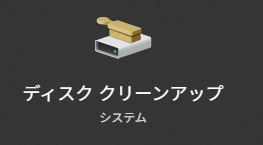
Disk Cleanup in particular can remove unrelated files if you delete things carelessly, so if you have lots of software installed, you may want to be extra careful.
(It should exclude files that could cause critical system issues, but if you’re not sure what you’re doing, proceed with caution.)
It sounds like trying the method above can help a bit for some people…
but in my case, the crashes continued.
Re-evaluating Driver Versions
In general, things tend to be stable if you’re on the driver version recommended by the manufacturer.
(Though it can vary depending on your hardware.)
The Wilds official account surveyed driver usage as of April 2025 and advised players to update to the latest version.
https://x.com/MH_Wilds/status/1908323873638265009?s=20
So basically, the cause is your environment.
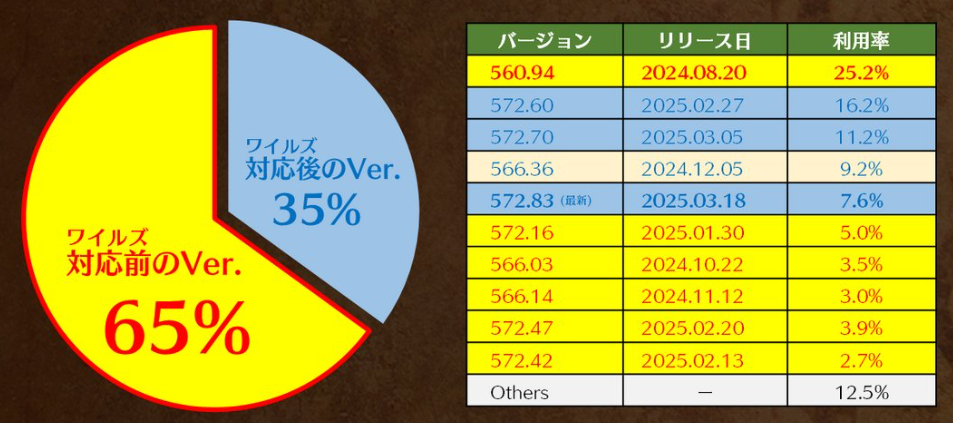
*If you are using RTX 40 / 30 series or below and you experience issues on the latest version, please try installing version “566.36”.
Quoted from the Wilds official account (April 2025)
Depending on your PC, rolling back to a stable version may improve things…
▼As of January 2026, the driver version I’m using is 591.44▼

[Reference] My PC Specs
CPU: Ryzen 7 5800X3D
GPU: NVIDIA GeForce RTX 3060 (VRAM 12GB)
RAM: 32GB
SSD: NVMe (1TB + 2TB)
DirectX: Supports 12 Ultimate
Driver model: WDDM 3.2
From memory, it was super stable on 560.94, and it felt like it got unstable around 581.08.
The game runs smoothly and the visuals look great, so I’m pretty happy with it.
Based on what I saw on Twitter, there are quite a few people who crash when entering a tent or when previewing equipment, and early on after the update there seemed to be a lot of reports of unstable graphics/behavior while in Iceshard Cliffs. (It seems stable now, so it may have been a bug.)
Reinstalling the Driver, etc.
Reinstalling the driver using DDU can also be effective.
It’s useful when installing drivers because it lets you update to the latest version or downgrade as well.
▼Official DDU site▼
https://www.wagnardsoft.com/
In the comments on my post, a lot of people recommended DDU as well.
Hardware-Related Issues
Especially in summer, heat can build up easily, and extreme temperatures can cause not only Wilds but your entire PC to crash.
(In my case, extreme heat once caused my SSD to act up.)
Just make sure you’ve got good airflow and reboot — that’ll fix it.
Depending on your PC, it can also crash when it can’t keep up with the processing load, so let’s check whether your system meets the recommended specs.
https://www.monsterhunter.com/support/wilds/ja-jp/faq/detail/052
They list the specs needed to run the game on medium graphics settings.
Also, you can download the benchmark test on Steam and re-check what score you get — that might help you find the settings that fit your PC best.
About the Possibility of Performance Improvements
There has been an interesting report on Reddit regarding performance issues in Monster Hunter Wilds.
According to investigations by overseas users, it appears that the game may be performing DLC ownership checks far more frequently than expected. If this check is constantly running in the background, it could potentially lead to FPS drops or overall performance instability.
※After further testing, it was also reported that the DLC check only triggers around Konatsu (the support desk Felyne), and it doesn’t appear to have any noticeable impact on the game’s overall performance.
The user behind this investigation reported that, after applying a test modification that makes the game recognize all DLC as owned, they observed an immediate improvement in performance.
Of course, it is currently unclear whether this behavior is intentional or simply an unintended bug, but at the very least, the user-side testing showed a noticeable difference.
Kinda wild that a DLC check could impact performance.
It is also worth noting that this information has already been shared with Capcom, so there is a possibility that future updates or fixes may address this issue.
Additionally, the same user has previously been involved in helping resolve performance-related problems in Dragon’s Dogma 2.
While this remains an unofficial investigation, it may represent a case that cannot be fully explained by simple “user environment” differences alone. It’s definitely something worth keeping an eye on moving forward.
Conclusion
Trying the three points below may reduce the chances of Wilds crashing while you play.
- Check whether your PC specs are appropriate
→ Make sure your settings match your hardware - Re-evaluate your driver version
→ Roll back to a stable version or try the latest version - Reboot if your PC is under heavy load
After trying a bunch of things, I finally beat Omega.
After re-checking my graphics driver and rebooting my PC, Wilds started running more stably, and I was able to clear Savage Omega again.
Crashes were happening frequently right after the update, so maybe my PC was under extra stress at the time.
If you know any other fixes, please drop a comment!

コメント